Skip to content

Josh's IT-Blog

Information Technology, and other interesting things …

  • Home
  • About
  • Contact
  • Links
  • Home
  • About
  • Contact
  • Links

Find AD-User from Email-Address

  1. Home   »  
  2. Find AD-User from Email-Address

Find AD-User from Email-Address

16. May 201116. May 2011 Burkard JoshActive Directory, Windows 2008 R2Tagged Active Directory

Problem:

Did you ever searched an special email-address in your active directory? If yes, you will know, that there isn’t a special field for the email-addresses.

Solution:

Go to active directory users and computers (ADUC).

Right click on the domain and choose Find.
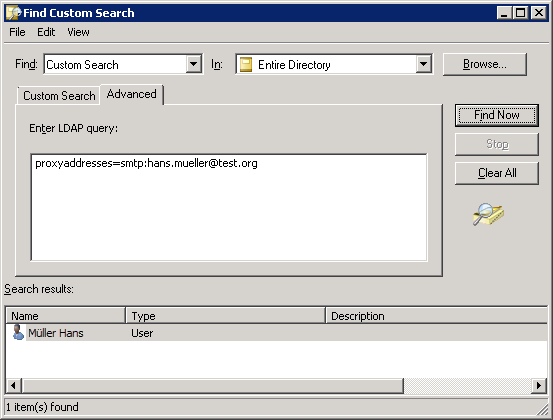
Select Custom Search in the Find-Field and Entire Directory in the In-Field.

Select the Advanced-Register and type this LDAP query:

proxyaddresses=SMTP:user@domain.com

Post navigation

Previous: ESXi 4.x: change the blocksize for a partition
Next: Monitor a SNMP device with Microsoft SCOM 2007 R2

About

Author Image
My name is Josh Burkard.
I'm a DevOps Engineer working with one of Europees largest payroll provider. in my work I have a lot to do with Microsoft server operating systems, System Center, VMware, Microsoft Azure Cloud and other software.
On this site I will write some posts about different technology problems and their solutions.
please note also my tweets and retweets from this area.

Categories

  • General (13)
  • Hardware (9)
    • Network (8)
      • Cisco (2)
    • Storage (2)
  • Hiking (1)
  • Home Assistant (5)
  • Microsoft Azure (1)
    • Automation (1)
  • PowerShell (3)
  • Software (1)
    • Excel (1)
  • System Center (18)
    • SCCM (3)
    • SCDPM (1)
    • SCOM (12)
    • SCSM (1)
    • SMA (1)
  • VMware (8)
  • Windows 2008 R2 (10)
    • Active Directory (7)
  • Windows 2012 R2 (1)
  • Windows 2016 (1)
  • Windows 7 (4)
    • BitLocker (1)
  • WordPress (1)
Proudly powered by WordPress | Theme: goldy-mex by inverstheme.