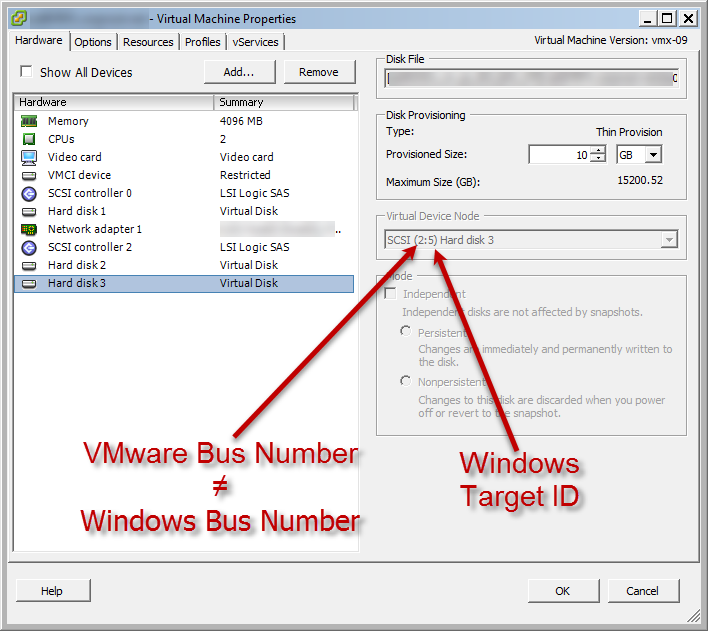
Some times I have the problem, I need to resize or delete a VMware virtual disk, but I only know the guest’s drive letter. In vm’s where there are only one virtual disk, or where each virtual disk has a different size, this isn’t a problem. but if you have a vm with multiple virtual disk with exactly the same size, you can’t compare it between the guest Disk Manager and the virtual disk sizes. if your vm has more than one SCSI controller, the problem will increase.
| Windows Disk Manager | VMware VM settings |
 |
 |
I searched long time to solve this problem, but I couldn’t find an easy solution for this. so I wrote this PowerShell script:
<#
.SYNOPSIS
    This script will return informations about virtual disks and windows disk allocation

.DESCRIPTION
    This script will return informations about virtual disks and windows disk allocation

.PARAMETER vCenterName
    defines the fqdn of the vCenter

.PARAMETER vmName
    defines the name of the vm (like naming in vCenter, not the fqdn / dns name)

.PARAMETER vmCred
    enter credentials to connect to the guest vm

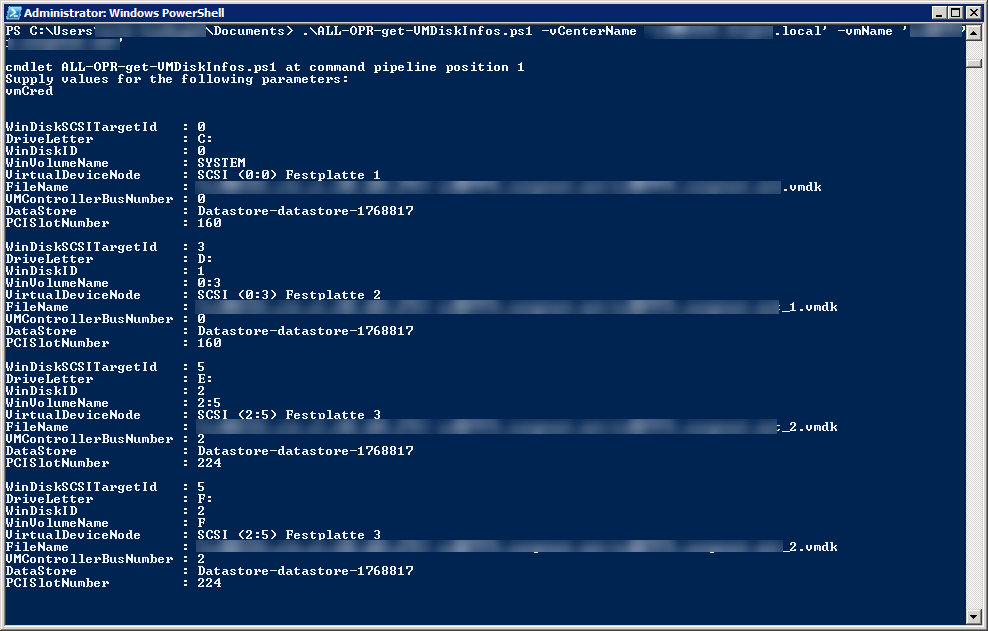
.EXAMPLE
    $vmCred = New-Object System.Management.Automation.PSCredential ('domain\username', ( ConvertTo-SecureString 'YourSecretPassword' -AsPlainText -Force ) )
    .\ALL-OPR-get-VMDiskInfos.ps1 -vCenterName 'vcenter.domain.local' -vmName 'VMName' -vmcred $vmCred

.NOTES
    -Author:		Josh Burkard
    -Email :		josh@burkard.it
    -CreationDate:	07.03.2018
    -LastModifiedDate:
    -Version:		1.0.0.0
    -History:
        07.03.2018	1.0.0.0	Josh Burkard	InitalVersion

.LINK

#>
Param
(
    # Parameter help description
    [Parameter(Mandatory=$true)][string]$vCenterName,
    [Parameter(Mandatory=$true)][string]$vmName,
    [System.Management.Automation.PSCredential][Parameter(Mandatory=$true)]$vmCred
)

#region Decalarations
#endregion Decalarations

#region Functions
#endregion Functions

#region Execution
    #region verify Params
        if ( [string]::IsNullOrEmpty( $vCenterName ) )
        {
            Write-Host  "parameter vCenterName was  not definied" -ForegroundColor Red
        } elseif ( [string]::IsNullOrEmpty( $vmName ) )
        {
            Write-Host  "parameter vmName was  not definied" -ForegroundColor Red
        } elseif ( [string]::IsNullOrEmpty( $vmCred ) )
        {
            $vmCred = Get-Credential
        } else {
            Write-Verbose "all needed parameters set"
        }
    #endregion verify Params


    #region load VMware Snapins
        Write-Verbose "load VMware Snappins"
        foreach ($comp in "VMware.VimAutomation.Core", "VMware.ImageBuilder") {
            if (Get-Module -ListAvailable -Name $comp -ErrorAction:SilentlyContinue) {
                if (!(Get-Module -Name $comp -ErrorAction:SilentlyContinue)) {
                    if (!(Import-Module -PassThru -Name $comp -ErrorAction:SilentlyContinue)) {
                        Write-Host "FATAL ERROR: Failed to import the $comp module!" -ForegroundColor Red
                        # Exit
                    }
                }
            } else {
                if (Get-PSSnapin -Registered -Name $comp -ErrorAction:SilentlyContinue) {
                    if (!(Get-PSSnapin -Name $comp -ErrorAction:SilentlyContinue)) {
                        if (!(Add-PSSnapin -PassThru -Name $comp -ErrorAction:SilentlyContinue)) {
                            Write-Host "FATAL ERROR: Failed to add the $comp snapin!" -ForegroundColor Red
                            # Exit
                        }
                    }
                } else {
                    Write-Host "FATAL ERROR: $comp is not available as a module or snapin! It looks like there is no compatible version of PowerCLI installed!" -ForegroundColor Red
                    # Exit
                }
            }
        }
    #endregion load VMware Snapins

    #region connect to vCenter
        Write-Verbose "connecting to vCenter $vCenterName"
        try
        {
            Connect-VIServer -Server $vCenterName -WarningAction SilentlyContinue | Out-Null
            Write-Verbose "connected to vCenter $vCenterName"
        } catch {
            $ErrorMessage = $_.Exception.Message
            # $FailedItem = $_.Exception.ItemName
            Write-Host "couldn't connect to vCenter '$vCenter'" -ForegroundColor Red
            Write-Host $ErrorMessage -ForegroundColor Red
            # Exit
        }
    #endregion connect to vCenter

    #region get VM
        $vm = Get-VM -Name $vmName
        if ( [string]::IsNullOrEmpty( $vm ) )
        {
            Write-Host  "VM not found" -ForegroundColor Red
            # exit
        } else {
            Write-Verbose "vm $vmName found"
        }
    #endregion get VM

    #region get VM View for SCSI Controller
        $vmview = Get-View -ViewType VirtualMachine -Filter @{"Name" = $vmName}
        if ( !( [string]::IsNullOrEmpty( $vmview ) ) )
        {
            Write-Verbose "vmView $vmName found"
            $vmDisks = @()
            $VirtualSCSIControllers = $vmview.Config.Hardware.Device | Where-Object {$_.DeviceInfo.Label -match "SCSI"}
            $VirtualSCSIController = $VirtualSCSIControllers[0]
            foreach ($VirtualSCSIController in $VirtualSCSIControllers )
            {
                $VirtualDiskDevices = $vmview.Config.Hardware.Device | Where-Object { $_.ControllerKey -eq $VirtualSCSIController.Key }
                foreach ($VirtualDiskDevice in $VirtualDiskDevices )
                {
                    $vmDisks += New-Object -TypeName PSObject -Property @{
                        VirtualDeviceNode    = "SCSI ($( $VirtualSCSIController.BusNumber ):$( $VirtualDiskDevice.UnitNumber )) $( $VirtualDiskDevice.DeviceInfo.Label )"
                        PciSlotNumber        = $VirtualSCSIController.SlotInfo.PciSlotNumber
                        DataStore            = $VirtualDiskDevice.Backing.DataStore
                        FileName             = $VirtualDiskDevice.Backing.FileName
                        ControllerKey        = $VirtualSCSIController.Key
                        DiskKey              = $VirtualDiskDevice.Key
                        ControllerBus        = $VirtualSCSIController.BusNumber
                        ControllerUnitNumber = $VirtualSCSIController.UnitNumber
                        DiskUnitNumber       = $VirtualDiskDevice.UnitNumber
                    }
                }
            }
        } else {
            Write-Host  "VMView not found" -ForegroundColor Red
            # exit
        }
    #endregion get VM View for SCSI Controller

    #region get Disk and volumes from guest system
        $scripttext = @"
[Int64]$('$')HKLM = "2147483650"
[String]$('$')value = "UINumber"
$('$')Reg_Query = Get-WmiObject -List "StdRegProv" -Namespace root\cimv2
$('$')PhysicalDisks = Get-WmiObject -Class "Win32_DiskDrive" -Namespace "root\CIMV2"
# $('$')PhysicalDisks
$('$')DiskDrives = Get-WmiObject Win32_DiskDrive
$('$')DiskInfos = Get-WmiObject Win32_DiskDrive | ForEach-Object {
    $('$')DiskDrive = $('$')_
    $('$')PNPDeviceID = $('$')DiskDrive.PNPDeviceID.split('\')
    $('$')key = "SYSTEM\CurrentControlSet\Enum\$('$')($('$')PNPDeviceID[0])\$('$')($('$')PNPDeviceID[1])\$('$')($('$')PNPDeviceID[2])"
    $('$')PciSlotNumber = ($('$')Reg_Query.GetDWORDValue($('$')HKLM,$('$')key,$('$')value)).uvalue

    $('$')UniqueId = ( ( $('$')PhysicalDisks | Where-Object { $('$')DiskDrive.DeviceID -eq "\\.\PHYSICALDRIVE$('$')( $('$')_.DeviceId )" } ).UniqueId )
    If ( [string]::IsNullOrEmpty( $('$')UniqueId ) )
    {
        $('$')UniqueId = ( $('$')PhysicalDisks | Where-Object { $('$')DiskDrive.DeviceID -eq $('$')_.Name } ).SerialNumber
    }
    $('$')DiskDriveToDiskPartitions = Get-WmiObject -Query "ASSOCIATORS OF {Win32_DiskDrive.DeviceID='$('$')($('$')DiskDrive.DeviceID)'} WHERE AssocClass = Win32_DiskDriveToDiskPartition"
    $('$')DiskDriveToDiskPartitions | ForEach-Object {
        $('$')partition = $('$')_

        $('$')LogicalDiskToPartitions = Get-WmiObject -Query "ASSOCIATORS OF {Win32_DiskPartition.DeviceID='$('$')($('$')partition.DeviceID)'} WHERE AssocClass = Win32_LogicalDiskToPartition"
        $('$')LogicalDiskToPartitions | ForEach-Object {
            New-Object -Type PSCustomObject -Property @{
                DiskSize        = $('$')DiskDrive.Size
                DiskModel       = $('$')DiskDrive.Model
                SCSIBus         = $('$')DiskDrive.SCSIBus
                SCSILogicalUnit = $('$')DiskDrive.SCSILogicalUnit
                SCSIPort        = $('$')DiskDrive.SCSIPort
                SCSITargetId    = $('$')DiskDrive.SCSITargetId
                PNPDeviceID     = $('$')DiskDrive.PNPDeviceID
                PciSlotNumber   = $('$')PciSlotNumber
                UniqueId        = $('$')UniqueId
                Partition       = $('$')partition.Name
                RawSize         = $('$')partition.Size
                DiskID          = $('$')partition.DiskIndex
                StartingOffset  = $('$')partition.StartingOffset
                DriveLetter     = $('$')_.DeviceID
                VolumeName      = $('$')_.VolumeName
                Size            = $('$')_.Size
                FreeSpace       = $('$')_.FreeSpace
            }
        }
    }
}
$('$')DiskInfos = $('$')DiskInfos | Where-Object { ( ! ( [string]::IsNullOrEmpty( $('$')_.UniqueId ) ) ) }
# $('$')DiskInfos | Sort-Object DriveLetter, DiskID | Select-Object -Unique UniqueId, DiskID, DriveLetter, SCSIBus, SCSILogicalUnit, SCSIPort, SCSITargetId, PNPDeviceID, PciSlotNumber | Format-Table
$('$')DiskInfos | convertTo-CSV
"@
        try {
            $WinDisks = Invoke-VMScript -VM $vm -ScriptText $scripttext -GuestCredential $vmCred -ErrorAction stop | convertfrom-csv
        }
        catch {
            $ErrorMessage = $_.Exception.Message
            # $FailedItem = $_.Exception.ItemName
            Write-Host "couldn't connect to VM guest" -ForegroundColor Red
            Write-Host $ErrorMessage -ForegroundColor Red
            exit
        }

    #endregion get Disk and volumes from guest system

    #region merge WinDisk and VMware Disk Infos
        $DiskInfos = @()
        # $WinDisk = $WinDisks[1]
        foreach ( $WinDisk in $WinDisks )
        {
            $vmDisk = $vmDisks | Where-Object { $_.PciSlotNumber -eq $WinDisk.PciSlotNumber -and $_.DiskUnitNumber -eq $WinDisk.SCSITargetId }
            $DiskInfos += New-Object -TypeName PSOBject -Property @{
                WinDiskID              = $WinDisk.DiskID
                PCISlotNumber          = $WinDisk.PciSlotNumber
                WinVolumeName          = $WinDisk.VolumeName
                WinDiskSCSITargetId    = $WinDisk.SCSITargetId
                DriveLetter            = $WinDisk.DriveLetter
                VMControllerBusNumber  = $vmDisk.ControllerBus
                VirtualDeviceNode      = $vmDisk.VirtualDeviceNode
                FileName               = $vmDisk.FileName
                DataStore              = $vmDisk.DataStore
            }
        }
        $DiskInfos
    #endregion merge WinDisk and VMware Disk Infos
#endregion Execution
when you run the script, it will ask you for credentials and then shows you the informations about booth of your virtual disk and Windows drive :